Indie EcoFlow monitoring project

EcoFlow monitoring app for real-time energy data

OctoMonitor is a browser-based EcoFlow monitoring app for live power, battery, solar, and device data, with local telemetry history, custom dashboards, reports, alerts, schedules, and automation tools for everyday energy management.

Produce detailed visual and text reports covering:

  • energy use and power flow
  • solar generation history
  • battery storage levels
  • device telemetry history
  • system diagnostics and performance trends

EcoFlow monitoring guides

Choose the monitoring view you need

Explore focused guides for live EcoFlow monitoring, flexible device dashboards, and local telemetry history. Each guide explains what OctoMonitor supports, where it fits beside the EcoFlow app, and what to check before relying on a workflow.

Latest app updates

Recent OctoMonitor improvements

Latest release

Release notes 0.0.789

Latest OctoMonitor release notes focus on more reliable update recovery after network interruptions, stalled states, and missed service-worker refreshes.

  • App updates now recover more reliably after a network interruption or stalled update state.
  • Update checks run again automatically when the app becomes visible again.
  • Recovery from a missed update condition is automatic so progress continues once the issue is fixed.
  • Service workers now retry update and cache refresh more consistently for fewer stuck update prompts.

Source: OctoMonitor release notes from octo-flow. Current app version checked: 0.0.815.

Earlier release notes

26 previous releases
Previous release

Release notes 0.0.787

Earlier OctoMonitor release notes from 6 July 2026.

  • Settings now opens and switches sections faster by loading inactive sections only when you need them.
  • What’s New history now waits until About opens, keeping Settings lighter while still preserving older release notes.
  • API, credential, telemetry, and recovery messages are clearer and more consistent across the app.
  • Support, update, and error recovery screens now load more reliably during navigation and app refreshes.

Source: OctoMonitor release notes from octo-flow. Current app version checked: 0.0.815.

Previous release

Release notes 0.0.786

Earlier OctoMonitor release notes from 4 July 2026.

  • Settings Search now helps you jump directly to the setting you need, including App Preferences and Device Name settings.
  • Device Name can now be edited in App Preferences to keep local device labels aligned with your preferences.
  • Dashboard, favourites, and solar setup imports now show shared loading feedback during transfer.
  • Feature import flows are now more consistent, so long-running transfers are easier to track at a glance.

Source: OctoMonitor release notes from octo-flow. Current app version checked: 0.0.815.

Previous release

Release notes 0.0.785

Earlier OctoMonitor release notes from 4 July 2026.

  • Feature exports now use typed OctoMonitor filenames so shared files are easier to identify.
  • Import screens now use matching file-type filters for favourites, dashboards, and solar setups.
  • You can set a favourite or custom dashboard as your default screen so the app opens where you want it.
  • Power flow visuals and Delta River controls are easier to read with restored rails and cleaner slider layout.

Source: OctoMonitor release notes from octo-flow. Current app version checked: 0.0.815.

Previous release

Release notes 0.0.781

Earlier OctoMonitor release notes from 1 July 2026.

  • Dashboard and widget previews now open their target screens more reliably when you tap a card.
  • Embedded device card previews now avoid accidental navigation so only intentional taps open a new view.
  • Favourite PowerStream cards are more compact and easier to scan in tight layouts.
  • Session expiry and sharing flows now recover more smoothly with fewer stale error states.

Source: OctoMonitor release notes from octo-flow. Current app version checked: 0.0.815.

Previous release

Release notes 0.0.780

Earlier OctoMonitor release notes from 1 July 2026.

  • Custom dashboard toolbar and preview fallback behaviour now stay more stable so layouts and controls remain accessible.
  • Export and import flows now include transfer reports, making backup and restore activity easier to review.
  • Export delivery options are clearer with a refined OctoMonitor sharing flow.
  • Toast messages and compact popovers now keep content readable instead of being clipped.

Source: OctoMonitor release notes from octo-flow. Current app version checked: 0.0.815.

Previous release

Release notes 0.0.779

Earlier OctoMonitor release notes from 30 June 2026.

  • Export, import, and share actions are more consistent across backup, reports, solar setup, favourites, and custom dashboard screens.
  • OctoMonitor now shows a startup splash with the app logo and loading spinner while the app opens.
  • Preview mode now includes current PowerStream widgets in the dashboard gallery, including Base Load controls.
  • Critical backup reports now preserve unchanged counts more reliably, avoiding missing totals when report data is reused.

Source: OctoMonitor release notes from octo-flow. Current app version checked: 0.0.815.

Previous release

Release notes 0.0.740

Earlier OctoMonitor release notes from 27 June 2026.

  • Expired sign-ins are now detected sooner, with stale sessions returned to login and a clear warning instead of leaving the app in a stuck state.
  • Delta Pro settings now use verified charge, discharge, and backup-reserve command paths so unsupported commands no longer appear to succeed.
  • Device setting status messages are clearer when changes are pending, unsupported, or waiting for device readback.
  • Delta Pro controls now recognise legacy and updated setting names so saved settings continue to map correctly after app updates.

Source: OctoMonitor release notes from octo-flow. Current app version checked: 0.0.815.

Previous release

Release notes 0.0.737

Earlier OctoMonitor release notes from 25 June 2026.

  • AC Input history reports now support importing and exporting source telemetry rows, making history transfer more convenient when you move between devices.
  • Favourite device controls now keep related controls and metrics in the same section for a simpler, more stable control experience.
  • PowerStream base-load and supply-priority controls are clearer with updated labels and guidance for what is being set.
  • After app refresh, navigation now returns to the correct parent page from devices, settings, and report views.
  • Export actions now use the native save-file flow so users can choose filename and destination, with clearer Smart Plug feedback when state updates are delayed.

Source: OctoMonitor release notes from octo-flow. Current app version checked: 0.0.815.

Previous release

Release notes 0.0.736

Earlier OctoMonitor release notes from 24 June 2026.

  • Smart plug controls now confirm toggle success from live status updates, with clearer recovery when commands return slowly or as unknown.
  • Socket and relationship workflows now show direct error messaging when settings fail to load or save, so failed actions are easier to identify.
  • Smart plug and socket status recovery is improved so temporary lag no longer leaves controls stuck waiting on stale state.
  • Favourites and custom dashboards can be imported and exported while preserving existing entries with unique names and IDs.
  • Session and credential handling is tightened, including safer runtime sign-out cleanup and notification-secret handling.

Source: OctoMonitor release notes from octo-flow. Current app version checked: 0.0.815.

Previous release

Release notes 0.0.735

Earlier OctoMonitor release notes from 23 June 2026.

  • Energy Flow now includes a relationship mapping setup and a real-time overview that explains how your solar, battery, load, and grid values connect.
  • Favourite navigation now returns you to where you started, including back navigation from device details and charts.
  • Solar setup workflows now enforce instance naming for export and give clearer setup validation before you save.
  • Solar setup delete, import, and validation actions are more reliable across desktop and mobile screens.
  • Outage alerts now include quick snooze options (5 min, 15 min, 1 hour, and longer) so notifications can pause while you fix issues.

Source: OctoMonitor release notes from octo-flow. Current app version checked: 0.0.815.

Previous release

Release notes 0.0.734

Earlier OctoMonitor release notes from 22 June 2026.

  • Custom dashboards now resize and repack widgets when you change the column count, so selected layouts fit the available space more predictably.
  • Compact custom dashboard controls now keep icons, labels, and switches inside each widget card.
  • Dashboard toolbar and column controls now adapt better across phone, tablet, and desktop widths.
  • Favourite pages now show a loading spinner while saved pages load, avoiding a brief empty-state flash.
  • Add credentials actions now open Settings to the sync password box and focus it so you can start typing.

Source: OctoMonitor release notes from octo-flow. Current app version checked: 0.0.815.

Previous release

Release notes 0.0.732

Earlier OctoMonitor release notes from 22 June 2026.

  • Demo mode can now be opened from the login page, so you can explore the dashboard before signing in or adding EcoFlow credentials.
  • After adding EcoFlow credentials from preview mode, the dashboard now clears preview filters so live devices appear immediately.
  • Delta Pro power-flow visuals now show a longer, lighter DC input line that matches the animated marker.
  • Live Delta Pro devices now show lifetime AC charge totals without mistaking that cumulative value for live AC input watts.

Source: OctoMonitor release notes from octo-flow. Current app version checked: 0.0.815.

Previous release

Release notes 0.0.731

Earlier OctoMonitor release notes from 21 June 2026.

  • Preview mode now offers a guided demo so you can explore OctoMonitor before adding EcoFlow API credentials.
  • Preview dashboards, reports, automations, schedules, history, and device controls now respond locally with demo data.
  • Smart Plug status is more reliable when background refreshes and live updates happen close together.
  • Database Management now shows loading feedback while local database tools are opening.

Source: OctoMonitor release notes from octo-flow. Current app version checked: 0.0.815.

Previous release

Release notes 0.0.730

Earlier OctoMonitor release notes from 20 June 2026.

  • Custom dashboard icon-key filtering now supports multi-select so you can quickly focus on the symbols you need.
  • EcoFlow devices can be linked to a dedicated socket and controlled directly from the main device card.
  • Socket link state is now kept in sync with live device telemetry for more reliable socket controls.
  • Device cards now use the same rendered layout path across dashboard and favourites pages.
  • Settings now remembers your last-open section so you return where you left off, including the What’s New area.

Source: OctoMonitor release notes from octo-flow. Current app version checked: 0.0.815.

Previous release

Release notes 0.0.729

Earlier OctoMonitor release notes from 20 June 2026.

  • The newest release notes now use paginated history so older updates stay easy to review.
  • Custom dashboard preview mode now supports a broader set of dashboard card and device combinations.

Source: OctoMonitor release notes from octo-flow. Current app version checked: 0.0.815.

Previous release

Release notes 0.0.720

Earlier OctoMonitor release notes from 19 June 2026.

  • Dashboard cards are now more compact and cards, search, and sort controls adapt better across phone, tablet, and desktop layouts.
  • Favourites now have a dedicated management page for creating, renaming, editing, and opening saved device pages.
  • Dashboard preview mode now covers more device profiles, including Delta Pro and richer multi-device comparisons.
  • Settings now routes missing API credentials into the secure sync-password workflow and keeps related controls focused.
  • Credential-related stale alerts are reduced when credentials are missing or revoked to avoid false positives.
  • PowerFlow visuals and page titles now respond better to responsive screen sizes.

Source: OctoMonitor release notes from octo-flow. Current app version checked: 0.0.815.

Previous release

Release notes 0.0.699

Earlier OctoMonitor release notes from 17 June 2026.

  • Report tables now support column filters, sortable columns, and Cards or Rows display modes.
  • Sunny Days reports now show highest, average, and estimated total solar input for each day.
  • Report tables and Settings About or Account panels now adapt better on phones, tablets, and desktop screens.
  • Bottom status banners for telemetry and API credentials can now be dismissed after review.
  • Missing EcoFlow MQTT credentials now appear as unavailable instead of an error.

Source: OctoMonitor release notes from octo-flow. Current app version checked: 0.0.815.

Previous release

Release notes 0.0.693

Earlier OctoMonitor release notes from 17 June 2026.

  • Preview mode now shows read-only demo devices and energy data when EcoFlow credentials are missing.
  • Critical backup imports now handle large backup files more reliably.
  • Critical backup history and export reports are now easier to find and review.
  • Smart Plug toggles and scheduled EcoFlow charge speed changes now send more reliably.

Source: OctoMonitor release notes from octo-flow. Current app version checked: 0.0.815.

Previous release

Release notes 0.0.685

Earlier OctoMonitor release notes from 12 June 2026.

  • Added critical data backup and restore.
  • Custom dashboards now use a fixed column count with responsive readouts.
  • Custom dashboards auto-organise layout when columns change.
  • Collapsed per-device MQTT diagnostics for cleaner device detail screens.

Source: OctoMonitor release notes from octo-flow. Current app version checked: 0.0.815.

Previous release

Release notes 0.0.681

Earlier OctoMonitor release notes from 11 June 2026.

  • Added a Support page with email and help link.
  • Long stale telemetry durations now show readable days, hours and minutes.
  • App now recovers automatically from stale dynamic import chunks.

Source: OctoMonitor release notes from octo-flow. Current app version checked: 0.0.815.

Previous release

Release notes 0.0.673

Earlier OctoMonitor release notes from 10 June 2026.

  • Custom dashboard widgets now show an icon key popover for quick reference.
  • Custom dashboard widgets use compact labels on narrow screens, keeping icons and values visible.

Source: OctoMonitor release notes from octo-flow. Current app version checked: 0.0.815.

Previous release

Release notes 0.0.659

Earlier OctoMonitor release notes from 10 June 2026.

  • Filtered live telemetry history now refreshes correctly.
  • Delta 2 Max solar input readings now use the documented mappings for more accurate values.
  • Settings controls are better aligned across the app.

Source: OctoMonitor release notes from octo-flow. Current app version checked: 0.0.815.

Previous release

Release notes 0.0.655

Earlier OctoMonitor release notes from 9 June 2026.

  • Live telemetry updates now working correctly again.

Source: OctoMonitor release notes from octo-flow. Current app version checked: 0.0.815.

Previous release

Release notes 0.0.654

Earlier OctoMonitor release notes from 9 June 2026.

  • PowerStream grid warnings now stay visible when live telemetry is incomplete or output values change.
  • PowerStream warning reports now include grid output details and link back to device history.
  • Telemetry and report cache handling are more reliable after recent fixes.

Source: OctoMonitor release notes from octo-flow. Current app version checked: 0.0.815.

Previous release

Release notes 0.0.651

Earlier OctoMonitor release notes from 8 June 2026.

  • Settings now includes a What’s New section with release history.
  • App updates can now show a one-time What’s New prompt.

Source: OctoMonitor release notes from octo-flow. Current app version checked: 0.0.815.

Previous release

Release notes 0.0.650

Earlier OctoMonitor release notes from 8 June 2026.

  • Telemetry now waits for fresh live data before replacing loading states.
  • Mobile power flow controls fit better on narrow phone screens.
  • Delta Pro and Delta 2 Max readings handle extra batteries more reliably.
  • PowerStream and Smart Plug warnings now give clearer diagnostics and controls.
  • Report cache maintenance is more reliable after app updates.

Source: OctoMonitor release notes from octo-flow. Current app version checked: 0.0.815.

View full release history

Interactive Tour

See OctoMonitor in Action

Watch our comprehensive feature walkthrough video to see how OctoMonitor aggregates devices, models solar inputs, visualizes real-time power flows, and runs offline-first automations.

EcoFlow companion

Where OctoMonitor Fits

OctoMonitor is not a complete replacement for the EcoFlow app. It does not offer every EcoFlow app feature, and some device setup, firmware, account, and vendor-specific controls still belong in EcoFlow's app.

It does cover much of the monitoring workflow, and it is built for stronger day-to-day monitoring when telemetry capture, charting, reporting, and custom dashboard monitoring matter more than a standard vendor overview. The reports and charts make historical power, solar, battery, and device behaviour easier to compare over time, and separate browser windows can be resized across monitors for parallel device and report views.

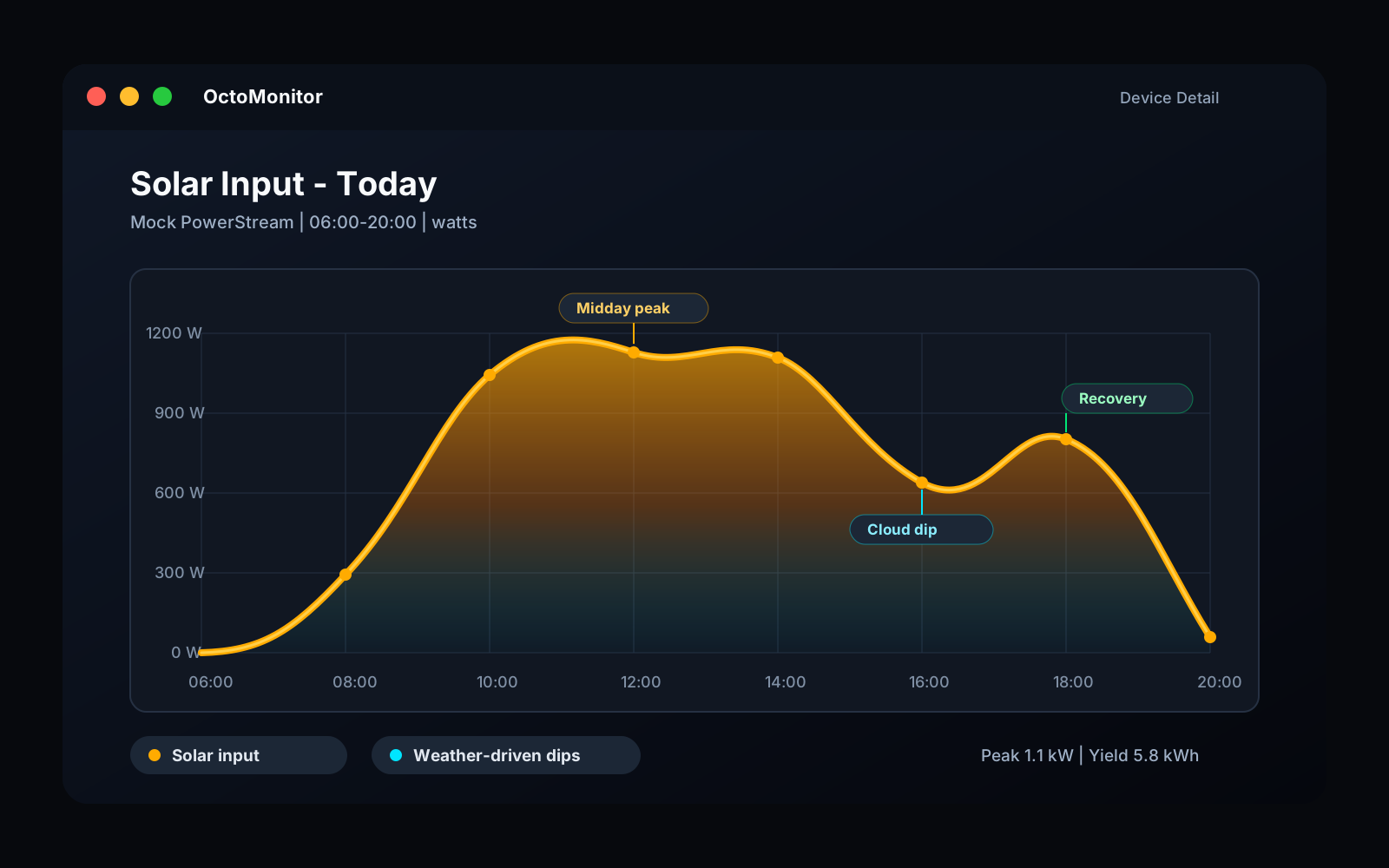
OctoMonitor solar input chart showing changing watts from morning to evening
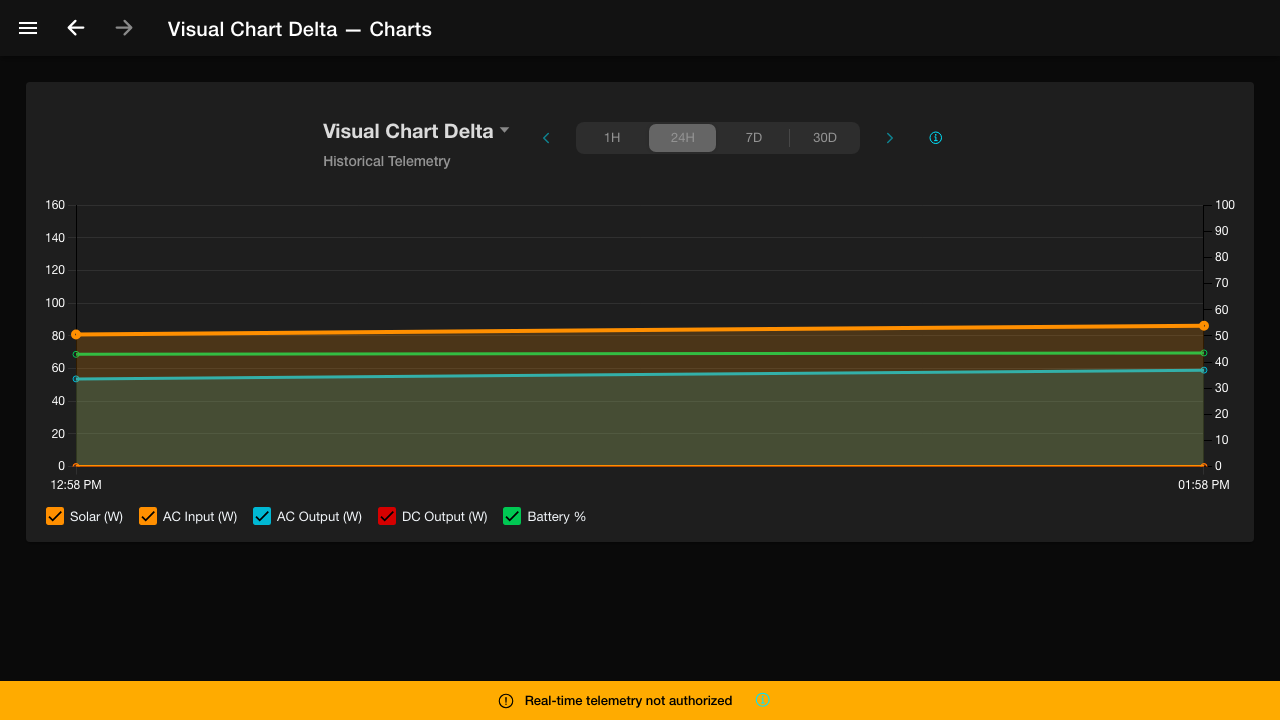
Telemetry and chartingSee how solar input rises, peaks, dips, and tapers throughout the day so generation patterns are easier to spot at a glance.
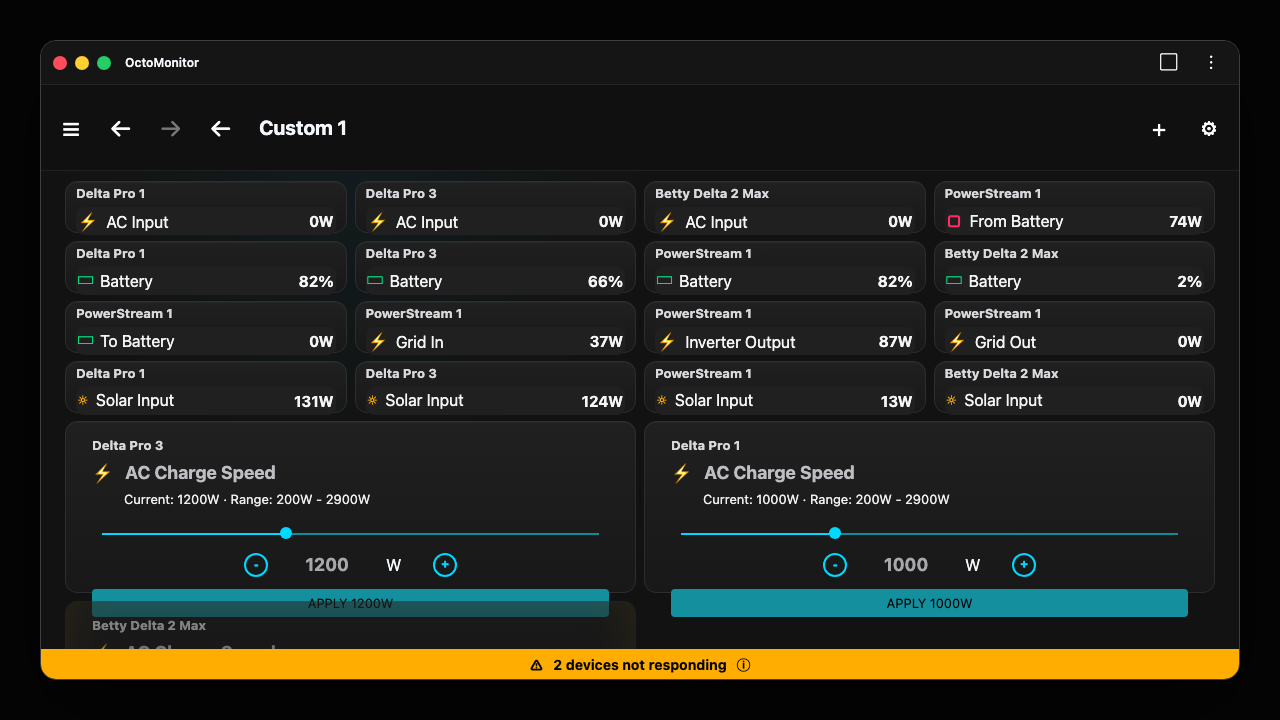
OctoMonitor custom dashboard showing battery solar socket and output widgets with live values and large controls
Custom dashboard monitoringArrange custom widgets, live readings, and writable controls around the devices you care about instead of staying limited to a fixed vendor screen.
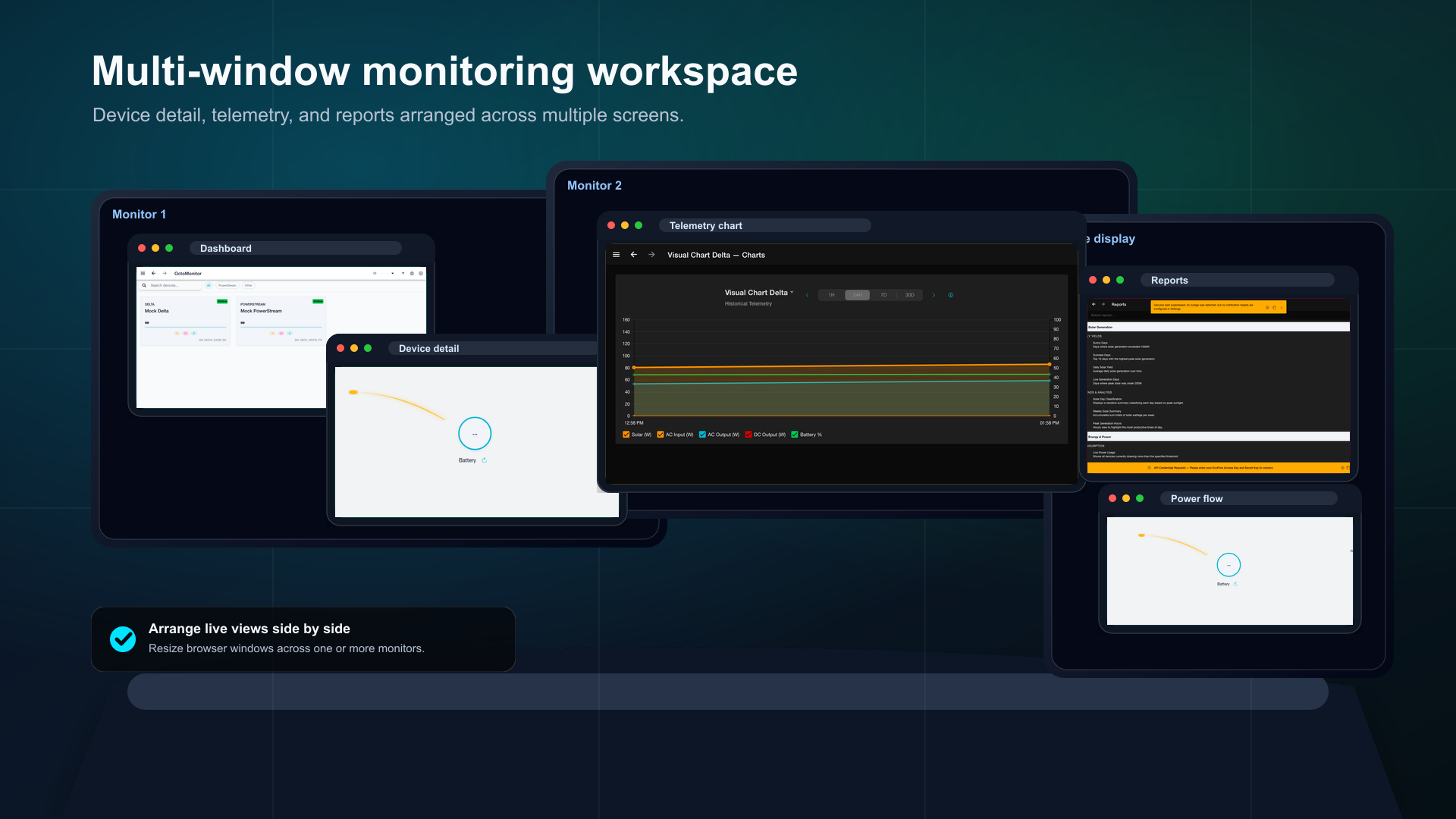
OctoMonitor multi-window workspace with device, telemetry, and report views aligned across desktop monitors
Multi-window workspaceResize and align device, telemetry, and report windows across monitors when a single dashboard is not enough.

Product

Product Capabilities

A focused view of the monitoring workflows OctoMonitor supports for devices, telemetry, reports, automations, and settings.

Device dashboard

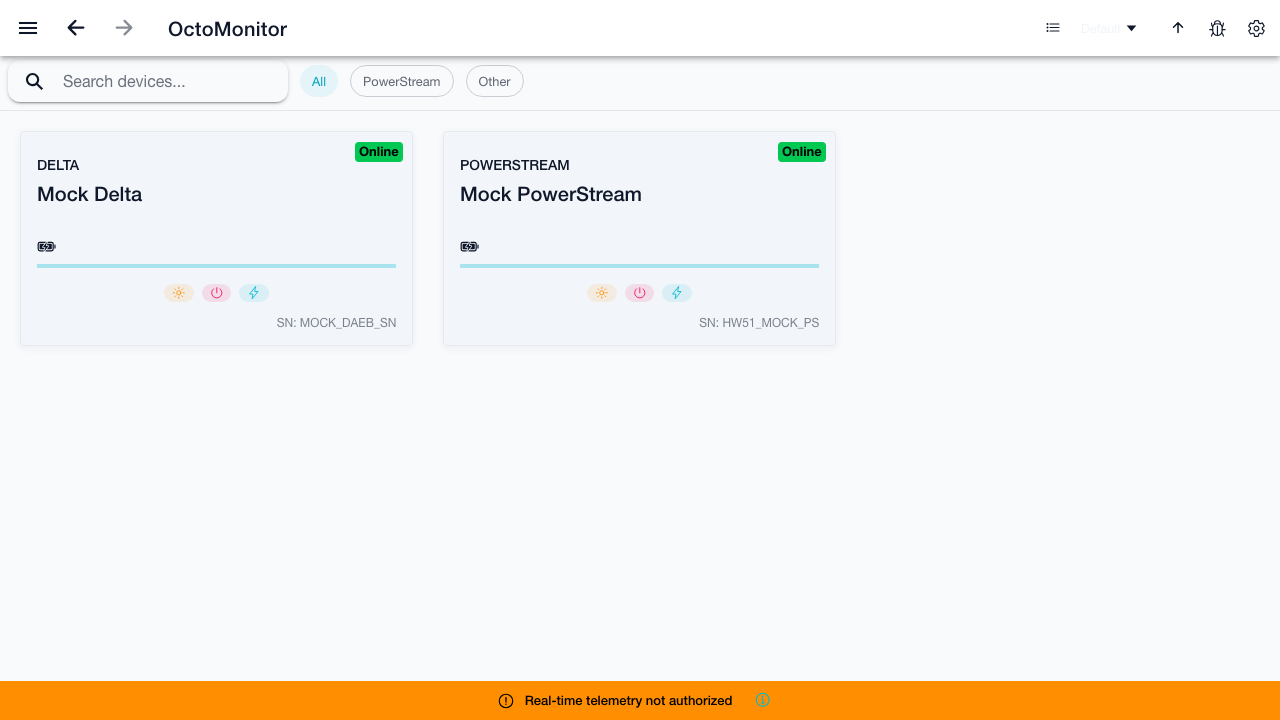
Monitor tested EcoFlow devices from searchable grid and list views with live status, battery, solar, and power metrics.

  • Search devices and device notes.
  • Currently tested with EcoFlow Delta Pro, Delta 2 Max, PowerStream, and EcoFlow Sockets.
  • Start by testing these device families first while we add additional device support over time.
  • Filter by All, Delta Max, Delta Pro, PowerStream, River, and Smart Plug.
  • Sort by name, AC input, AC output, and solar input.
  • Review online/offline status, battery state, and live power values.

Device control and detail views

Inspect individual devices with power-flow views, last-data status, settings links, and controls for supported outputs.

  • Show device last data time and unavailable-device guidance.
  • Visualize solar, AC, DC, battery, and output flow for supported devices.
  • Expose device settings and refresh actions from the detail toolbar.
  • Support smart plug power state and wattage views.

Multi-window monitoring

Keep separate browser windows open for device detail, telemetry, and reports so multiple screens or monitors can show the views you need at once.

  • Open device detail, telemetry chart, and report URLs in separate browser windows.
  • Resize and align windows so several devices or reports stay visible at once.
  • Use one monitor for live device state while another keeps reports or historical telemetry in view.
  • Arrange multiple browser windows without exposing private telemetry in the marketing site assets.

Solar setup configuration

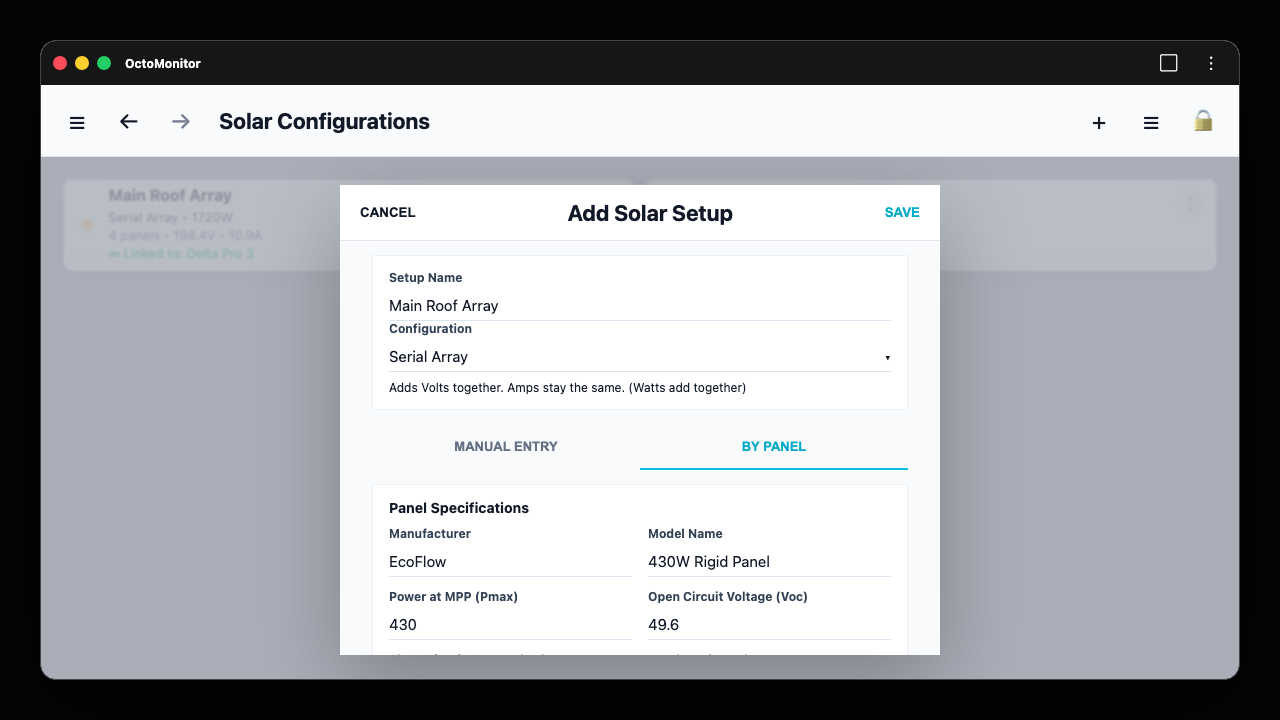
Model solar arrays with manual or panel-spec entry, serial and parallel calculations, installation details, and device links.

  • Configure single-panel, serial array, parallel array, and custom solar setups.
  • Use panel specifications to calculate wattage, voltage, and current from panel count.
  • Record orientation, azimuth, tilt, shading, optimizer use, capacity limits, and notes.
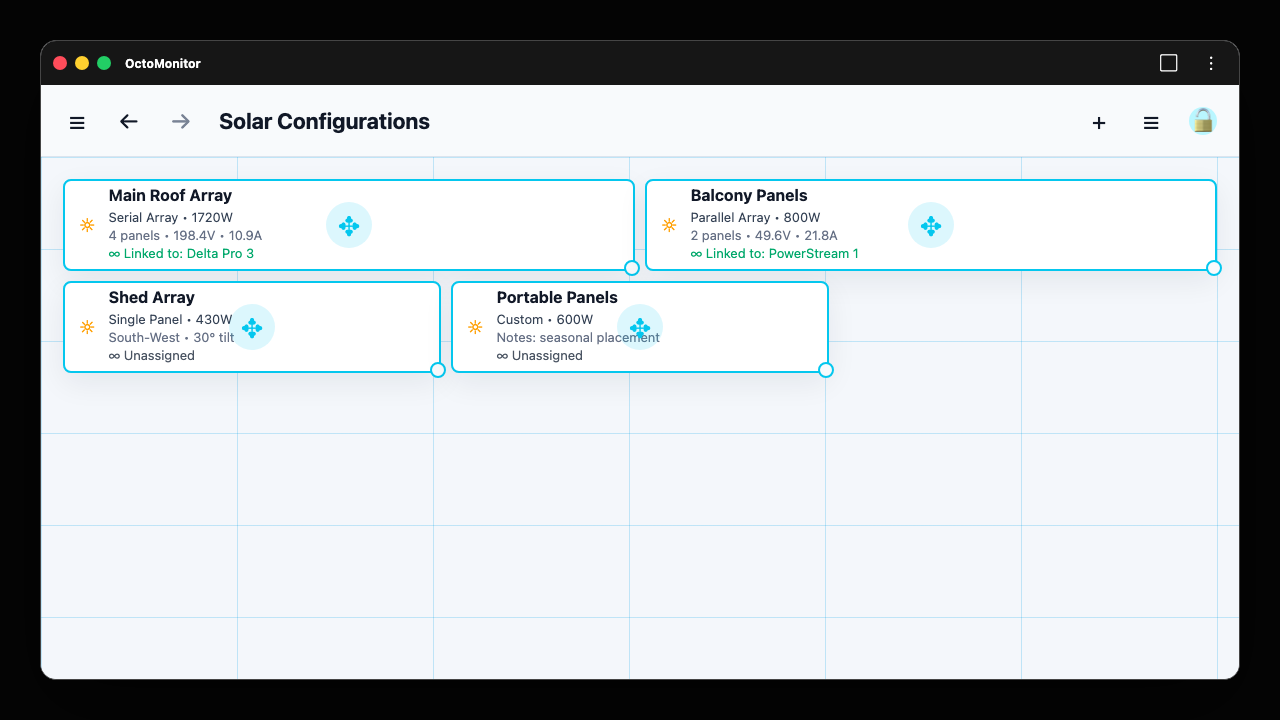
  • Link setups to EcoFlow devices and organize setup cards in grid or list layouts.

Live and historical telemetry

Record and inspect MQTT telemetry with pause controls, stale warnings, filters, notes, and local history.

  • Pause or resume the live telemetry feed.
  • Filter live and historical rows by device, time, date, notes, and sort order.
  • Configure stale timeout behavior.
  • Open historical records from local storage with filtered and total counts.

Reports and diagnostics

Analyze telemetry and device events through categorized reports for solar, power, battery, diagnostics, and audits.

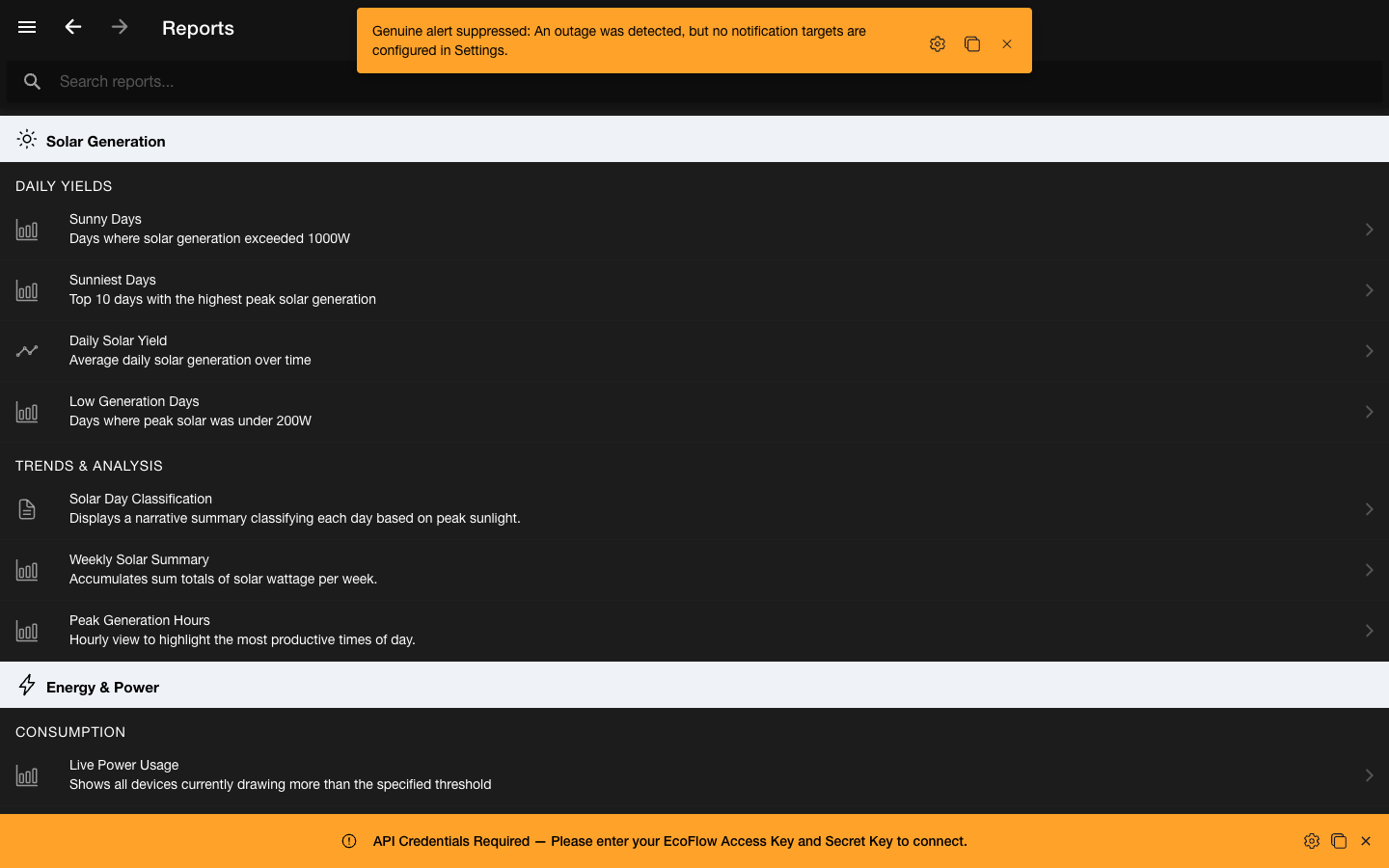
  • Solar reports include Sunny Days, Sunniest Days, Daily Solar Yield, and Peak Generation Hours.
  • Power reports include Live Power Usage and Solar vs Grid Split.
  • Diagnostics cover telemetry gaps, coverage, connectivity reliability, command lifecycle, and fault timelines.
  • Report viewer supports chart and table modes where configured.

Automations and schedules

Create local automation rules for time, Agile tariff pricing, solar surplus, and device battery state triggers.

  • Trigger rules from time, tariff price, solar surplus, or battery level.
  • Run actions such as AC output changes, grid charging changes, charge limits, PowerStream priority, or notifications.
  • Reorder, duplicate, edit, enable, and delete automation rules.
  • Manage smart plug schedules from dedicated schedule screens.

Settings, install, and resilience

Configure account, install guidance, display theme, EcoFlow access, telemetry timing, alerts, and app resilience settings.

  • Use the dedicated Get App panel for PWA and browser install guidance.
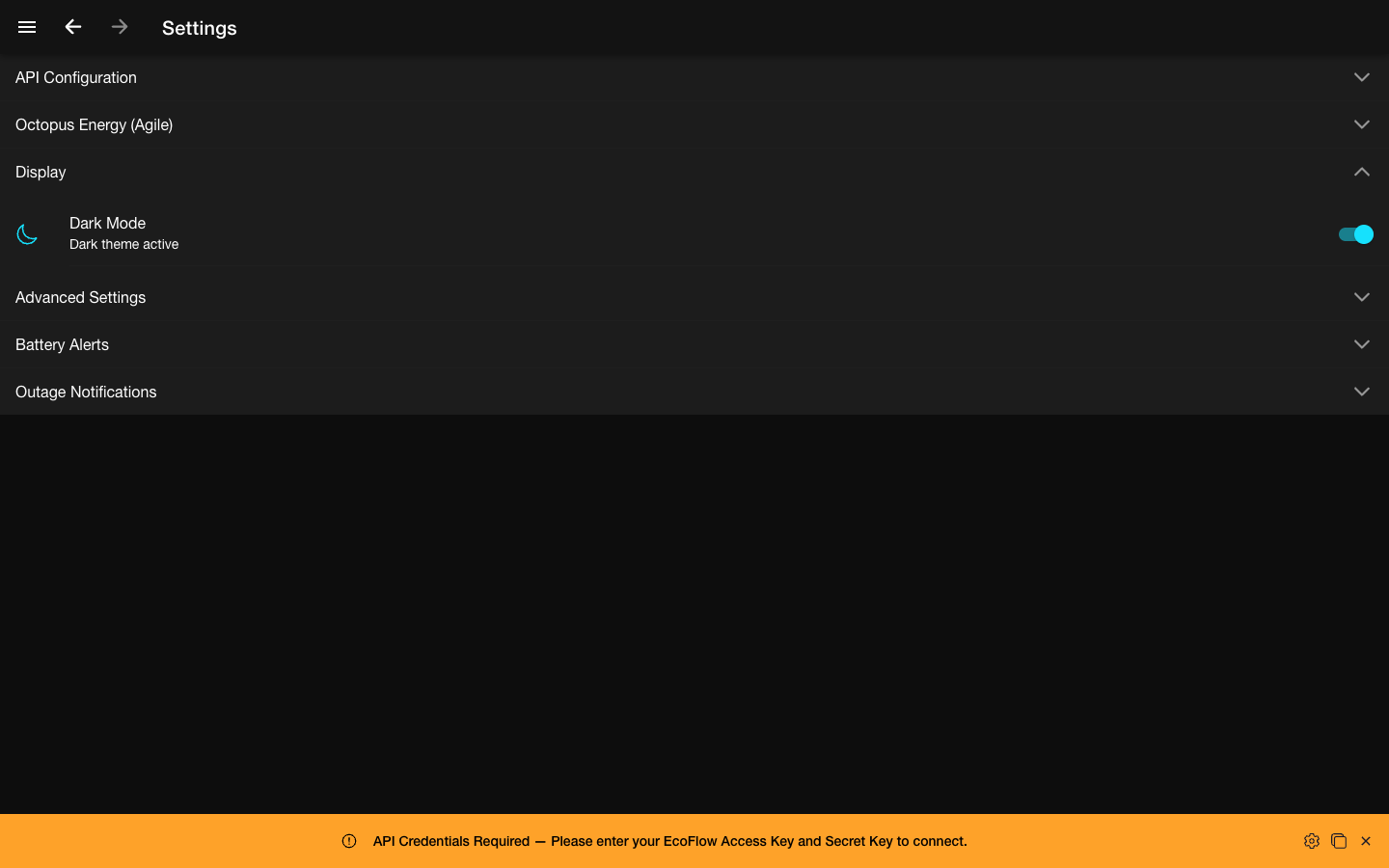
  • Switch between system, light, and dark display modes.
  • Configure telemetry timing, battery alerts, outage notifications, and app preferences.
  • Surface stale devices, credential warnings, migration progress, and offline state banners.

Interface

Screenshots

These screenshots were copied from existing OctoMonitor E2E or UI audit artifacts, plus a composed multi-window workspace using those same safe screens. They use mock, empty, or non-sensitive states.

OctoMonitor dashboard showing mock device cards and search controls
DashboardDashboard search, type filters, grid cards, online badges, and power metrics.
OctoMonitor custom dashboard showing battery solar socket and output widgets with live values and large controls
Custom dashboard showcaseCustom dashboard with battery, solar, socket, input, output, and large slider controls.
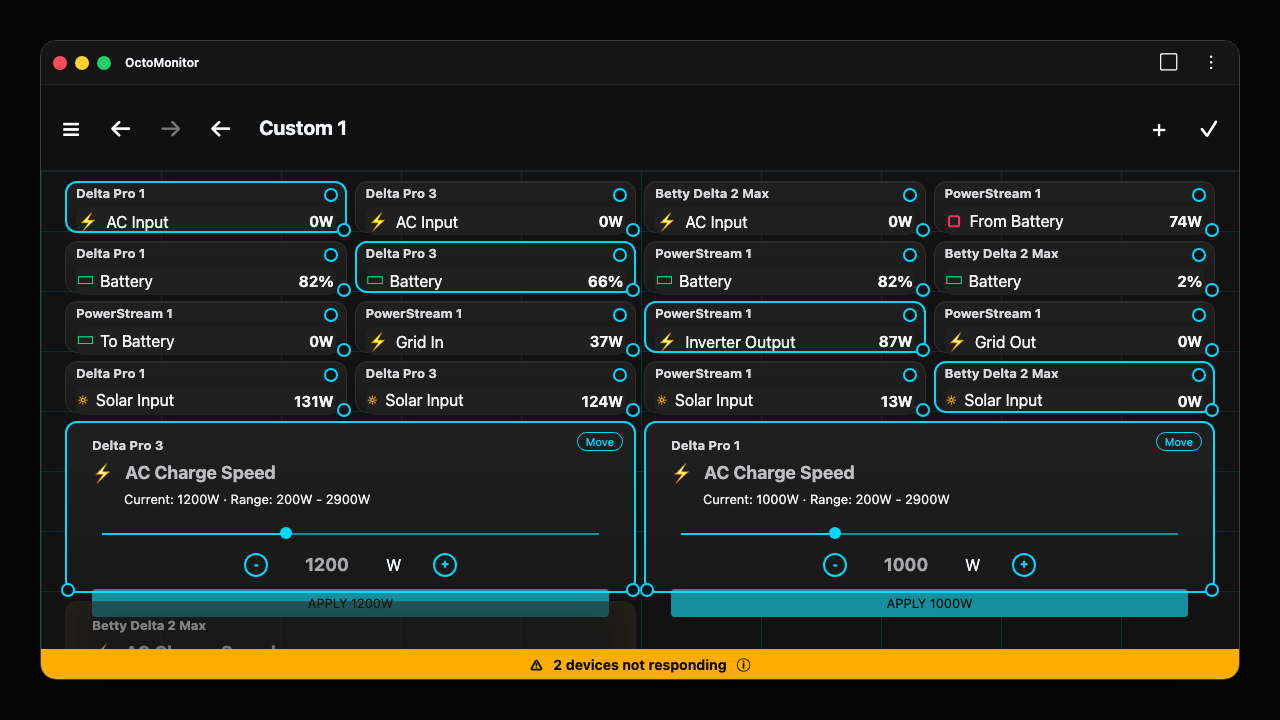
OctoMonitor custom dashboard edit mode showing grid placement resize handles and compact controls
Custom dashboard edit modeEdit mode exposes drag, resize, and compact controls so widgets can be shaped around the monitoring layout.
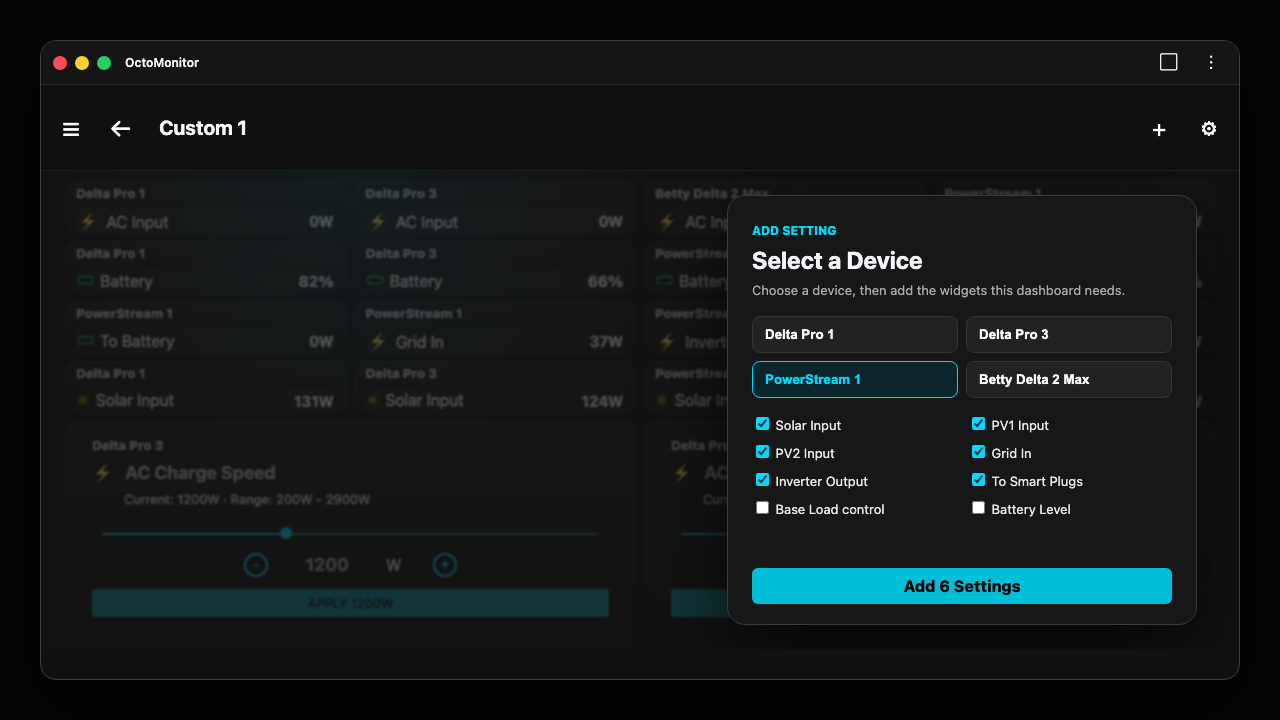
OctoMonitor custom dashboard add setting picker with devices and available widgets
Custom dashboard widget pickerAdd Setting lets dashboards mix device settings, read-only telemetry, and writable controls.
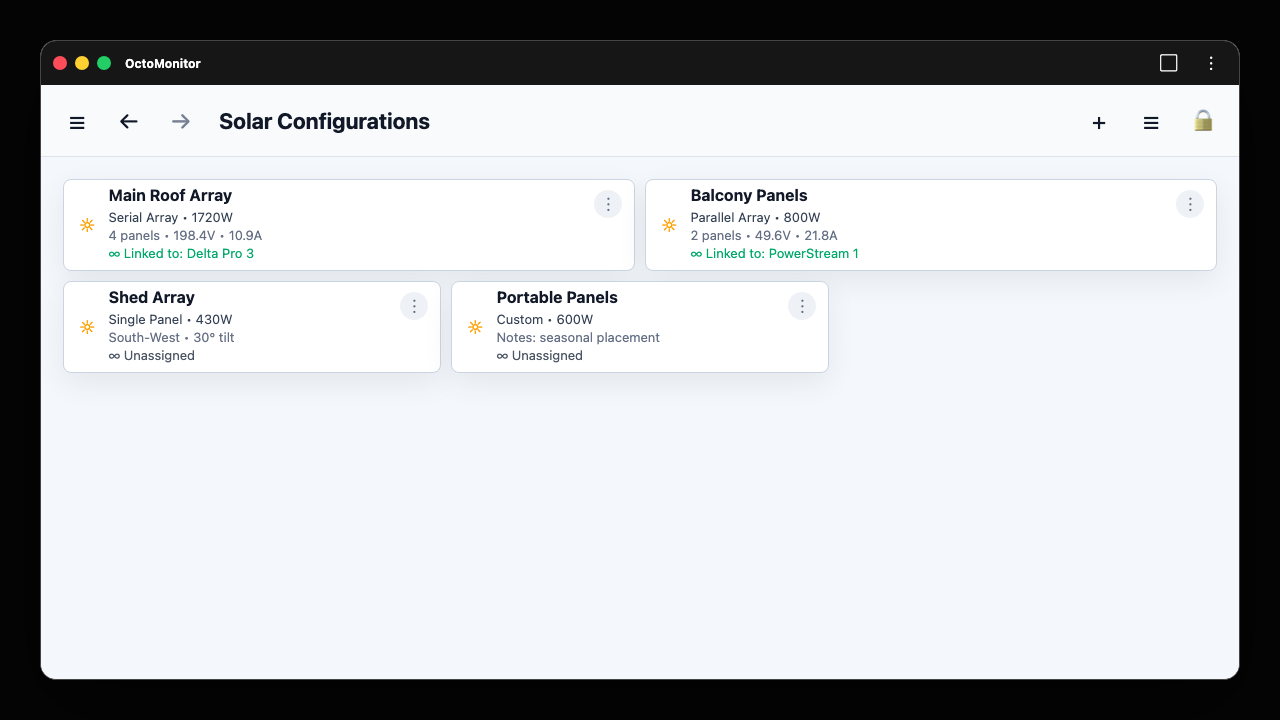
OctoMonitor solar setup overview showing linked and unassigned solar array cards
Solar setup overviewSolar Configurations grid showing linked and unassigned arrays with configuration type, wattage, and device links.
OctoMonitor solar setup panel specifications form with calculated serial array totals
Solar setup panel specsThe Add Solar Setup flow supports By Panel input, serial and parallel calculations, panel specs, and installation details.
OctoMonitor solar setup layout editor showing grid placement and resize handles
Solar setup layout editorSolar setup cards can be arranged in grid mode with drag and resize handles, then switched back to list view.
OctoMonitor telemetry chart with time range controls and metric legend
Telemetry chartsHistorical chart with 1H, 24H, 7D, and 30D ranges plus selectable metrics.
OctoMonitor reports list grouped by solar generation and energy categories
ReportsReport catalogue organized by Solar Generation, Energy and Power, Battery Storage, and diagnostics.
OctoMonitor multi-window workspace with device, telemetry, and report views aligned across desktop monitors
Multi-window workspaceA workspace across multiple monitors with device detail, telemetry, and report windows resized and aligned for parallel monitoring.
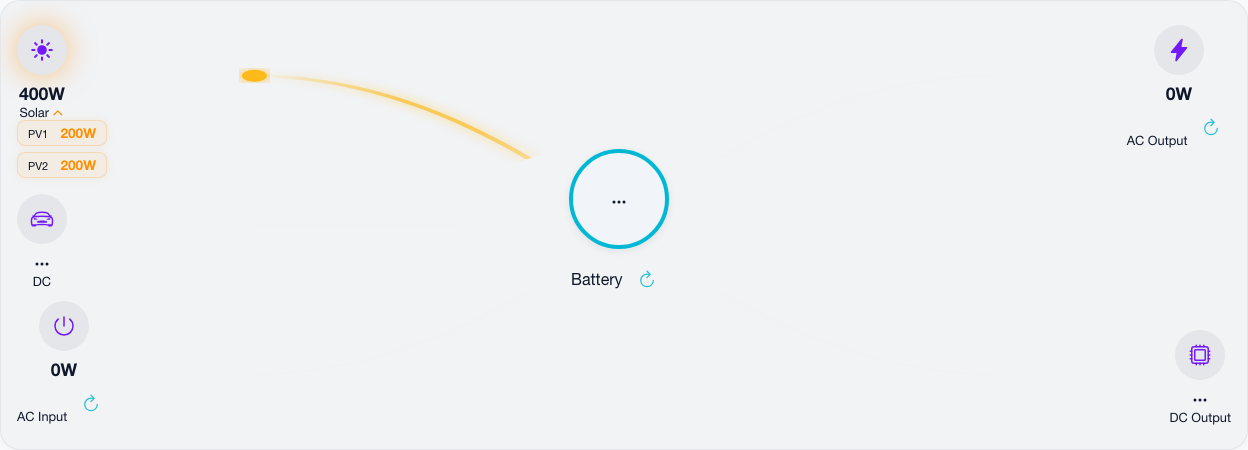
OctoMonitor device power flow view showing solar, battery, AC, and DC nodes
Power flowDevice detail power-flow view for supported Delta style devices.
OctoMonitor settings page showing display theme controls
SettingsSettings accordions for display, access, telemetry timing, alerts, and app preferences.

Guides

How-to Videos

Local demo recordings show the key workflows with safe mocked app states, including multi-window monitoring, so private runtime data stays out of the site.

0:32 walkthrough

Request EcoFlow developer access

Open the EcoFlow Developer Portal, request access, and find where approved accounts create API credentials.

Open EcoFlow Developer Portal
Transcript

Open the EcoFlow Developer Portal, sign up or sign in, request developer access with an application, wait for approval, then open the API credentials area to create an Access Key and Secret Key before adding them to OctoMonitor.

  • Visit developer-eu.ecoflow.com and click "Become a Developer".
  • Log in with your regular EcoFlow account.
  • Wait for EcoFlow to approve your developer request; this may take days (users in community forums report roughly a one-week delay).
  • After receiving an email titled "Approval notice from EcoFlow Developer Platform," go to the security page and generate an AccessKey and SecretKey.
0:44 walkthrough

Set up EcoFlow access

Open API settings, create a Sync Password, enter EcoFlow API credentials, and show how they are safely stored and restored with Sync Password.

Transcript

Open API settings, create a Sync Password, choose Create Sync Vault, enter EcoFlow API credentials using Access Key, Secret Key, and Region, then use the encrypted vault for safe storage so credentials can be restored with the same Sync Password later.

0:45 walkthrough

Build a custom dashboard

Create a named dashboard, add battery, solar, socket, and output widgets, resize cards, and save the layout.

Transcript

Open Custom Dashboards, choose Create Dashboard, enter a Dashboard Name, select the new dashboard, use Add Setting, choose Select a Device, add battery, solar, socket, and output widgets including AC Charge Speed, enter edit mode, resize and compact cards, then save the layout as the saved custom dashboard.

0:38 walkthrough

Configure solar setups

Add a solar setup from panel specifications, review calculated wattage, link the setup to a device, and adjust the layout.

Transcript

Open Solar Configurations, choose Add Solar Setup, enter the setup name, switch to By Panel, choose Serial Array, enter Power at MPP, Open Circuit Voltage, Short Circuit Current, and panel count so calculations derive wattage, voltage, and current, save the setup, use Link to Device, then open the layout editor to arrange the solar setup cards.

0:34 walkthrough

Compare telemetry charts

Compare multiple devices on the same chart, switch timeframes, and use the legend to select Solar, AC Output, and Battery data.

Transcript

Open Historical Telemetry, use Compare with to add multiple devices to the same chart, switch between 1H, 24H, and 7D timeframes, then use the legend to compare Solar, AC Output, and Battery data.

0:12 walkthrough

Monitor multiple windows

Open device and report views in separate browser windows, then resize and align them across multiple monitors for parallel monitoring.

Transcript

Open a device detail view, report, and telemetry chart in separate browser windows, then resize and align the windows across multiple monitors so device state and report output stay visible together.

0:22 walkthrough

Watch device power flow

Open a device detail page and watch solar input, AC input, and AC output animate around the battery.

Transcript

Open a device detail page, review the animated solar input path, watch AC input flow into the battery, and confirm AC output flows to loads with active telemetry values.

0:10 walkthrough

Create an automation

Choose a trigger, select an action, test the rule, and save it.

Transcript

Open automations, start a new rule, choose a trigger, choose an action, and review the saved rule list.

Documentation

Documentation

A generated quick-start based on verified OctoMonitor screens and configuration surfaces.

Install and first run

  1. Open Settings and expand Get App for PWA or browser install guidance.
  2. Open API Configuration and add EcoFlow access credentials only inside the app.
  3. Choose a supported EcoFlow region in the app settings before loading devices.
  4. Use App Status when the browser cannot present a direct install prompt.

Monitor devices

  1. Use the dashboard search boxes to find devices or device notes.
  2. Switch between grid and list layouts from the dashboard toolbar.
  3. Filter by device type and sort by name, AC input, AC output, or solar input.
  4. Open a device card to inspect its detail view and power-flow metrics.

Current tested devices

  1. OctoMonitor has currently been tested with EcoFlow Delta Pro, Delta 2 Max, PowerStream, and EcoFlow Sockets.
  2. Please test with these device families first before relying on the app with other EcoFlow hardware.
  3. We will add additional device support over time through community testing and safe validation.
  4. If you try another device family, compare dashboard values, telemetry, and any writable controls carefully before treating it as fully supported.

Review telemetry

  1. Open Telemetry Live to watch the MQTT feed and pause it when needed.
  2. Expand Filters and Sorting to filter by device, time, date, notes, and sort mode.
  3. Use Telemetry Settings to adjust stale timeout behavior.
  4. Open Telemetry History for persisted local telemetry and filtered record counts.

Monitor across windows

  1. Open a device detail view or report URL in a new browser window from the browser controls.
  2. Repeat for the devices, telemetry charts, or reports that need to stay visible.
  3. Then resize and align the windows across one screen or multiple monitors to build a monitoring workspace.
  4. Keep only the app instances you need connected to live EcoFlow access to reduce unnecessary API and MQTT load.

Configure solar setups

  1. Open Solar Setups or Solar Configurations and choose Add Solar Setup.
  2. Choose Single Panel, Serial Array, Parallel Array, or Custom and select Manual Entry or By Panel.
  3. Use By Panel to enter Power at MPP, Open Circuit Voltage, Short Circuit Current, and panel count so OctoMonitor calculates total wattage, voltage, and amperage.
  4. Record orientation, azimuth, tilt angle, shading profile, optimizer use, capacity limits, and notes where useful.
  5. Use Link to Device to associate the setup with an EcoFlow device, then switch grid/list view or layout editor to arrange the setup cards.

Privacy-first local data

  1. OctoMonitor uses 100% local OctoMonitor data storage for telemetry history, dashboards, notes, and automations, apart from the direct EcoFlow API connection needed to read and control devices.
  2. That means there is no OctoMonitor-hosted telemetry cloud and no additional third-party cloud receiving your device history from OctoMonitor.
  3. This local-first, client-side architecture is deliberate: your browser or native app keeps the data, and the trade-off is that browser/PWA automations run while the app remains open.
  4. Use Keep App On in the browser version to help stop the browser from putting the page to sleep and keep telemetry gathering and local automations active.
  5. The native mobile app can normally continue with its background worker feature and the mobile device keep-awake feature, subject to OS battery controls.

Analyze reports

  1. Open Reports and browse categories such as Solar Generation, Energy and Power, Battery Storage, and System Diagnostics.
  2. Use report search to narrow report names and descriptions.
  3. Open live reports for current snapshots or historical reports for stored telemetry windows.
  4. Use table or chart modes where a report exposes both views.

Automate behavior

  1. Open Automations and create a rule from the add action.
  2. Choose a time, Agile tariff, solar surplus, or battery-level trigger.
  3. Choose a device command or notification action.
  4. Use rule actions to edit, duplicate, delete, reorder, or enable rules.

Tune settings and safeguards

  1. Use Display settings to choose system, light, or dark theme.
  2. Use EcoFlow Access settings to control direct access, realtime MQTT, and live telemetry recording.
  3. Use Telemetry Timing to tune freshness, live status refresh, REST fallback, and online polling intervals.
  4. Use Battery Alerts and Outage Notifications for local alert behavior where runtime capabilities allow it.

Support

FAQ

Is OctoMonitor an indie project?

Yes. OctoMonitor is an indie project focused on practical, local-first EcoFlow monitoring for people who want deeper telemetry, dashboards, reports, and automations.

Does the site copy any EcoFlow credentials?

No. The site uses only static marketing content and non-secret screenshots.

Are all features on this page verified?

Yes. The feature list is based on routes, templates, models, documentation, and screenshots inspected from the existing OctoMonitor app.

Which EcoFlow devices has OctoMonitor been tested with?

OctoMonitor has currently been tested with EcoFlow Delta Pro, Delta 2 Max, PowerStream, and EcoFlow Sockets. Please test with these device families first; we will add additional device support over time through community testing and safe validation.

How were the videos recorded?

They are local demo recordings captured from safe mocked app states, including the multi-window monitoring workflow, so the site can show workflows without exposing private account data.

Does telemetry keep recording when I close the app?

Privacy-first by design. OctoMonitor uses 100% local OctoMonitor data storage with no OctoMonitor-hosted cloud for telemetry history or automations. In the browser/PWA version, that local-first trade-off means telemetry and automations run while the app is open, so use Keep App On to help stop the browser from sleeping the page. The native mobile app can normally continue with its background worker feature and mobile device keep-awake feature, subject to OS battery settings.

Is OctoMonitor only a web app?

The inspected app is an Angular/Ionic app with Capacitor and PWA support, plus browser install guidance.

Explore the verified OctoMonitor workflow

Start with the documentation, then review the screenshot gallery to see the inspected product surfaces.

OctoMonitor home siteIndependent project; OctoMonitor is not affiliated with EcoFlow.