38 built-in reports
Search by question, metric, or evidence
Find the report that matches your question.
38 built-in reports
Search and category choices stay on this page and reset when you reload. Nothing is stored or sent, and this page does not run a report.
- Solar GenerationDaily Yields
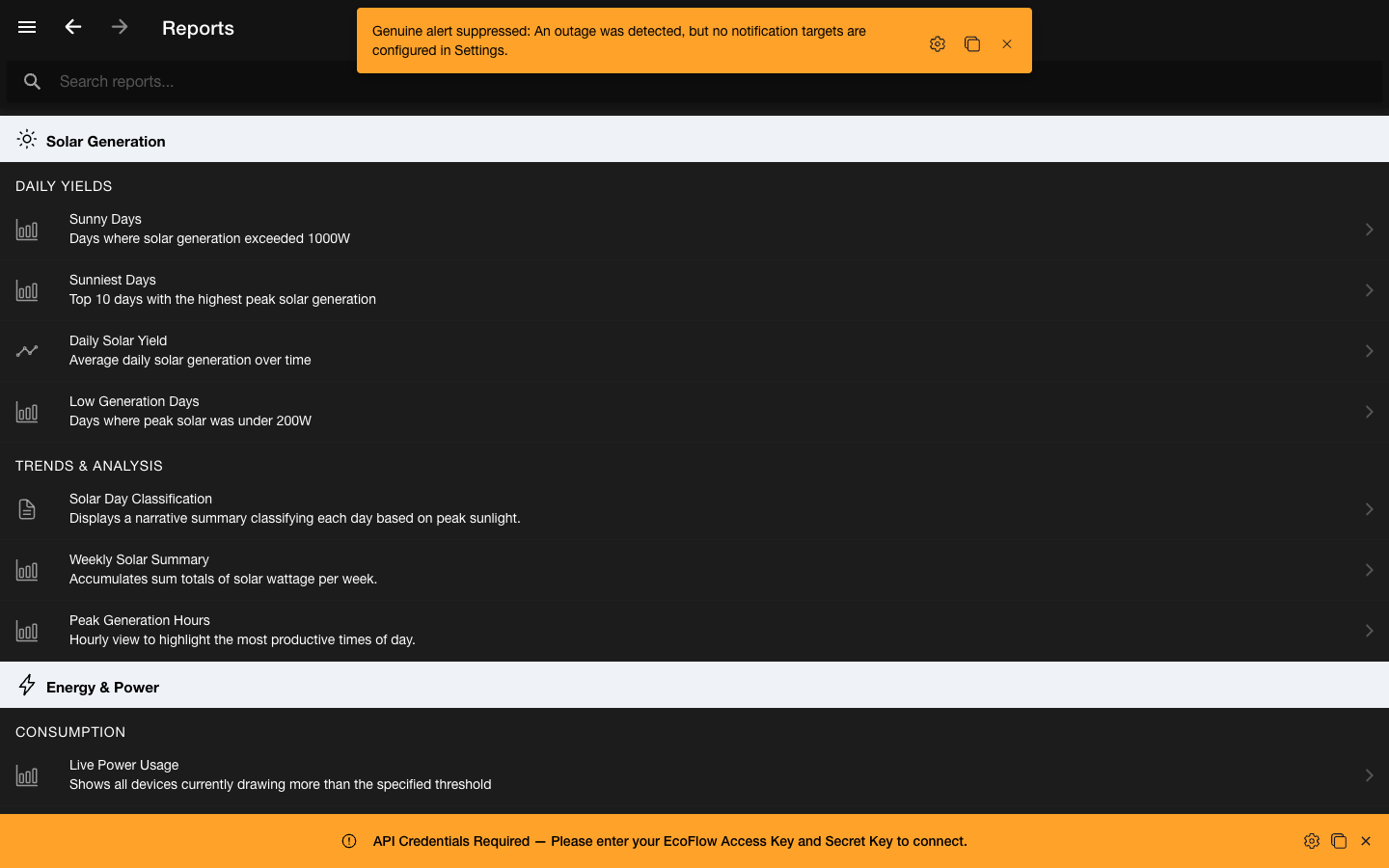
Sunny Days
Telemetry history
Days where solar generation exceeded 1000W.
Open reportRequirements and reading
- Requires
- Locally retained telemetry containing the named readings and timestamps for the selected period.
- Read it as
- Use the daily peak and summary views to find locally recorded days that crossed the fixed 1000W threshold.
- Solar GenerationDaily Yields
Sunniest Days
Telemetry history
Top 10 days with the highest peak solar generation.
Open reportRequirements and reading
- Requires
- Locally retained telemetry containing the named readings and timestamps for the selected period.
- Read it as
- Use the ranked daily maximum PV-input samples to compare the strongest recorded solar peaks.
- Solar GenerationDaily Yields
Daily Solar Yield
Telemetry history
Daily solar peak and average power, with estimated energy from recorded telemetry.
Open reportRequirements and reading
- Requires
- Locally retained telemetry containing the named readings and timestamps for the selected period.
- Read it as
- Compare peak and average watts with estimated kWh. Review the recorded period and gaps before comparing daily totals.
- System DiagnosticsTelemetry Health
Telemetry Gaps Analysis
Telemetry history
Shows days and hours where telemetry data is missing.
Open reportRequirements and reading
- Requires
- Locally retained telemetry containing the named readings and timestamps for the selected period.
- Read it as
- Use hourly and daily gap groupings to locate periods without accepted local samples in the report scope.
- System DiagnosticsTelemetry Health
Telemetry Coverage Analysis
Telemetry history
Shows days and hours where telemetry data is available.
Open reportRequirements and reading
- Requires
- Locally retained telemetry containing the named readings and timestamps for the selected period.
- Read it as
- Use hourly and daily availability groupings to see where OctoMonitor retained samples for the report scope.
- System DiagnosticsTelemetry Health
Telemetry Storage Footprint
Telemetry history
Counts telemetry log rows and estimates serialized IndexedDB storage by hour, day, week, and month.
Open reportRequirements and reading
- Requires
- Locally retained telemetry containing the named readings and timestamps for the selected period.
- Read it as
- Use row counts and estimated serialized size to compare how retained telemetry grows across time granularities.
- Solar GenerationTrends & Analysis
Solar Day Classification
Telemetry history
Displays a narrative summary classifying each day based on peak sunlight.
Open reportRequirements and reading
- Requires
- Locally retained telemetry containing the named readings and timestamps for the selected period.
- Read it as
- Use the fixed PV-input peak bands to scan locally recorded days from no generation through very sunny.
- Battery StorageHealth & Lifecycle
Battery Health Trends
Telemetry history
Evaluates global battery level trends across the last month.
Open reportRequirements and reading
- Requires
- Locally retained telemetry containing the named readings and timestamps for the selected period.
- Read it as
- Use daily averages of recorded battery percentage to compare state-of-charge patterns over the last month.
- Battery StorageHealth & Lifecycle
Battery Level Timeline
Telemetry history
Shows when each battery percentage was first observed, how long it lasted, and the adjacent levels.
Open reportRequirements and reading
- Requires
- Locally retained telemetry containing the named readings and timestamps for the selected period.
- Read it as
- Use first-seen, last-seen, duration, sample count, and adjacent levels to inspect recorded state-of-charge changes.
- Solar GenerationTrends & Analysis
Weekly Solar Summary
Telemetry history
Accumulates sum totals of solar wattage per week.
Open reportRequirements and reading
- Requires
- Locally retained telemetry containing the named readings and timestamps for the selected period.
- Read it as
- Use the grouped sum of recorded PV-input watt samples to compare relative weekly sample totals.
- Energy & PowerEnergy Mix
Solar vs Grid Split
Telemetry history
Compares average solar input versus grid input across all logged metrics.
Open reportRequirements and reading
- Requires
- Locally retained telemetry containing the named readings and timestamps for the selected period.
- Read it as
- Use the relative average PV-input and grid-input watt samples to compare the two recorded power sources.
- Energy & PowerEnergy Mix
PowerStream Grid Flow History
Telemetry history
Tracks average PowerStream grid import and export readings from telemetry history.
Open reportRequirements and reading
- Requires
- Locally retained telemetry containing the named readings and timestamps for the selected period.
- Read it as
- Use hourly averages to compare reported gridInputWatts with invToGridWatts on the PowerStream AC path.
- Solar GenerationLive Input
PowerStream Solar Input History
Telemetry history
Tracks average PowerStream PV1 and PV2 solar input readings from telemetry history.
Open reportRequirements and reading
- Requires
- Locally retained telemetry containing the named readings and timestamps for the selected period.
- Read it as
- Use hourly PV1 and PV2 average watt samples to compare supported PowerStream solar input channels.
- Energy & PowerConsumption
AC Input History
Telemetry history
Hourly AC input watts with the first and last observed battery percentages and their signed change.
Open reportRequirements and reading
- Requires
- Locally retained telemetry containing the named readings and timestamps for the selected period.
- Read it as
- Read battery change as percentage points, not energy. Missing battery readings remain unavailable; an hourly power reading does not identify what switched a socket on.
- Energy & PowerConsumption
Smart Plug Power & Energy History
Telemetry history
Observed socket power and estimated energy, with PowerStream socket-power comparisons where available.
Open reportRequirements and reading
- Requires
- Locally retained telemetry containing the named readings and timestamps for the selected period.
- Read it as
- Review watt-hour rollups alongside coverage. Gaps over five minutes are excluded from estimates rather than filled with assumed readings.
- Energy & PowerLifetime Totals
Lifetime Energy by Device
Device snapshot and history
Available lifetime solar and AC input counters with AC and DC output estimates from saved telemetry.
Open reportRequirements and reading
- Requires
- Available device counters and saved telemetry for estimated output and coverage details.
- Read it as
- Distinguish device counters from history-based estimates. Results show coverage and gaps; saved results can be reused while a fresh scan runs in the open app.
- Energy & PowerLifetime Totals
Lifetime Energy Coverage Gaps
Device snapshot and history
Historical telemetry gaps excluded from estimated AC and DC output energy.
Open reportRequirements and reading
- Requires
- Available device counters and saved telemetry for estimated output and coverage details.
- Read it as
- Use the missing intervals to understand how much history supports a lifetime estimate. A gap is unknown usage, not zero consumption.
- Solar GenerationTrends & Analysis
Peak Generation Hours
Telemetry history
Hourly view to highlight the most productive times of day.
Open reportRequirements and reading
- Requires
- Locally retained telemetry containing the named readings and timestamps for the selected period.
- Read it as
- Use ranked hourly average PV-input samples to identify times associated with stronger recorded solar input.
- Solar GenerationDaily Yields
Low Generation Days
Telemetry history
Days where peak solar was under 200W.
Open reportRequirements and reading
- Requires
- Locally retained telemetry containing the named readings and timestamps for the selected period.
- Read it as
- Use daily maximum PV-input samples below the fixed threshold to find weak locally recorded peaks.
- Energy & PowerConsumption
Live Power Usage
Live devices
Shows all devices currently drawing more than the specified threshold.
Open reportRequirements and reading
- Requires
- A connected supported device with a current reading for the named metric and threshold.
- Read it as
- Use the adjustable threshold to focus the current supported device-output readings above a chosen watt level.
- Solar GenerationLive Input
Live Solar Input
Live devices
Shows all devices currently receiving more than the specified solar threshold.
Open reportRequirements and reading
- Requires
- A connected supported device with a current reading for the named metric and threshold.
- Read it as
- Use the adjustable threshold to focus current supported PV-input readings above a chosen watt level.
- System DiagnosticsTelemetry Health
Telemetry & Status Issues
Device events
Shows failed and stale telemetry or status refresh attempts by device.
Open reportRequirements and reading
- Requires
- Locally recorded device events for supported fields during the selected period.
- Read it as
- Use timestamps, operation, transport, reason, status, and correlation evidence to inspect recorded refresh issues.
- System DiagnosticsTelemetry Health
No Data Telemetry by Device
Device events
Shows device-level telemetry outages, duration, recovery status, and known causes.
Open reportRequirements and reading
- Requires
- Locally recorded device events for supported fields during the selected period.
- Read it as
- Use start, end, duration, recovery status, operation, transport, and recorded reason to inspect no-data events.
- System DiagnosticsDevice Audit
Device Event Timeline
Device events
Shows semantic device status, setting, mode, and fault changes in chronological order.
Open reportRequirements and reading
- Requires
- Locally recorded device events for supported fields during the selected period.
- Read it as
- Use old and new values, source, initiator, reported time, and correlation IDs to reconstruct the recorded sequence.
- System DiagnosticsDevice Audit
Device Event Counts
Device events
Ranks the most frequently changing semantic device fields.
Open reportRequirements and reading
- Requires
- Locally recorded device events for supported fields during the selected period.
- Read it as
- Use event counts grouped by field to identify the supported values that changed most often in the period.
- System DiagnosticsDevice Audit
Command Lifecycle
Device events
Correlates user or system command requests with telemetry or command-confirmation read-backs.
Open reportRequirements and reading
- Requires
- Locally recorded device events for supported fields during the selected period.
- Read it as
- Use requested and confirmed values, latency, confirmation source, status, and correlation IDs to inspect command evidence.
- System DiagnosticsDevice Audit
Unconfirmed Change Attempts
Device events
Shows requested device changes that were not confirmed or were later reported with a different value.
Open reportRequirements and reading
- Requires
- Locally recorded device events for supported fields during the selected period.
- Read it as
- Use request, reported value, status, latency, source, and correlation evidence to review unresolved attempts.
- System DiagnosticsFaults & Alarms
Fault & Alarm Timeline
Device events
Shows EcoFlow fault, warning, and alarm states appearing, changing, or clearing.
Open reportRequirements and reading
- Requires
- Locally recorded device events for supported fields during the selected period.
- Read it as
- Use the chronological state changes to see when supported fault, warning, and alarm fields appeared or cleared.
- System DiagnosticsNetwork Reliability
Connectivity Reliability
Device events
Summarizes online, Wi-Fi, and Bluetooth outage counts and offline duration by device.
Open reportRequirements and reading
- Requires
- Locally recorded device events for supported fields during the selected period.
- Read it as
- Use outage counts, total and maximum offline duration, and last transition times to compare recorded device connectivity.
- System DiagnosticsDevice Audit
Configuration Change Audit
Device events
Shows charge limits, standby timers, power policy, and other configuration changes.
Open reportRequirements and reading
- Requires
- Locally recorded device events for supported fields during the selected period.
- Read it as
- Use old and new values, source, initiator, and correlation evidence to inspect recorded supported-setting changes.
- Energy & PowerConsumption
Output State Sessions
Device events
Derives AC, DC, USB, and Smart Plug enabled periods from semantic toggle events.
Open reportRequirements and reading
- Requires
- Locally recorded device events for supported fields during the selected period.
- Read it as
- Use derived start, end, and enabled duration to compare recorded output-on sessions for supported toggles.
- System DiagnosticsNetwork Reliability
Device Churn & Flapping
Device events
Ranks fields and devices with frequent semantic state changes in the selected period.
Open reportRequirements and reading
- Requires
- Locally recorded device events for supported fields during the selected period.
- Read it as
- Use event count, changes per day, category, and first and last seen times to locate noisy recorded fields.
- Battery StoragePolicy & Backup
Battery & Charging Policy Changes
Device events
Shows charging mode, charge speed, SOC limits, pause states, and related battery policy changes.
Open reportRequirements and reading
- Requires
- Locally recorded device events for supported fields during the selected period.
- Read it as
- Use old and new values, source, initiator, and time to inspect supported battery and charging-policy changes.
- Energy & PowerPowerStream Policy
PowerStream Policy Changes
Device events
Shows base load, supply priority, charge/discharge limit, and inverter brightness policy changes.
Open reportRequirements and reading
- Requires
- Locally recorded device events for supported fields during the selected period.
- Read it as
- Use old and new values, source, initiator, and time to inspect supported PowerStream policy changes.
- Energy & PowerPowerStream Policy
PowerStream Grid Import Warnings
Device events
Shows when PowerStream grid input exceeds the configured warning threshold and whether output headroom was available.
Open reportRequirements and reading
- Requires
- Locally recorded device events for supported fields during the selected period.
- Read it as
- Use recorded grid input, inverter output, threshold, base load, demand estimate, and headroom fields to review warnings.
- Battery StoragePolicy & Backup
Extra Battery & UPS Events
Device events
Shows extra battery connection, active BMS, UPS/EPS, and backup-mode event changes.
Open reportRequirements and reading
- Requires
- Locally recorded device events for supported fields during the selected period.
- Read it as
- Use chronological reported changes to inspect supported extra-battery, BMS, UPS, EPS, and backup-mode fields.
- System DiagnosticsDevice Audit
Audit Quality
Device events
Shows source, initiator, correlation, and reported-time coverage across recorded device events.
Open reportRequirements and reading
- Requires
- Locally recorded device events for supported fields during the selected period.
- Read it as
- Use missing-metadata counts grouped by source to judge how complete the recorded audit context is.
- Smart AutomationsExecution History
Automated Execution History
Execution history
Scheduled, delayed, automated, and manual device commands recorded by OctoMonitor, with triggers and outcomes.
Open reportRequirements and reading
- Requires
- Actions recorded by OctoMonitor for the selected device and period.
- Read it as
- Confirmed means a matching readback was recorded where supported. Sent or unconfirmed does not prove the final device state. EcoFlow app actions, physical controls, and other controllers are not recorded here.
Start with the evidence your question needs
Choose live reports for current readings, telemetry reports for saved history, and device-event reports for recorded changes and faults. Lifetime reports combine available device counters with history-based estimates. Automated Execution History shows actions sent through OctoMonitor.
Each entry explains what data it needs and how to read the result. Check the selected device, period, and coverage when comparing reports.
- Use live reports for current supported readings above a chosen threshold.
- Use telemetry reports for trends, comparisons, coverage, and locally retained history.
- Use device events for changes and warnings, and execution history for app-recorded commands and outcomes.
- Match each report to its source and selected period.
Keep calculation and device context visible
Several built-in reports aggregate watt samples with average, maximum, or sum operations. Those summaries can be useful for comparison without becoming utility-meter energy, cost, export, or self-consumption evidence.
Battery percentage reports describe reported state of charge, not measured health or capacity. PowerStream inverter-output fields describe a device-side AC path, not certified utility-grid export. Locally recorded gaps and events show OctoMonitor evidence, not an external root cause.
- Compare like units, source fields, devices, and time ranges.
- Treat missing samples as unknown rather than zero.
- Use certified meters and tariff records for billing or settlement decisions.
- Use device manuals and qualified guidance for electrical and battery-safety decisions.
Open the exact report
Choose Open report to go straight to that report in OctoMonitor. Results use the devices and data available in your app.
Missing readings remain gaps. If live data cannot be read, the app shows an unavailable state instead of displaying demo rows.
- Search and filter the static catalogue without sending a query.
- Open the report that matches the question and source.
- Review telemetry coverage when a historical result looks unexpectedly sparse.
- Keep the official EcoFlow app for firmware, account, setup, and vendor diagnostics.