Support status
Monitoring for your EcoFlow devices
See the readings, reports, and controls available for each device. Features depend on the device, firmware, region, and EcoFlow API.
EcoFlow DELTA Pro
Follow battery charge, solar input, and power use from the dashboard through to charts, reports, and device settings.
- Live battery, solar, AC, DC, and output readings
- Power-flow views and local telemetry history
- Supported charge, discharge, reserve, and output controls
Available settings depend on the device firmware and the EcoFlow API values exposed for your unit.
EcoFlow DELTA 2 Max
See power flow, battery and extra-battery readings, charging history, and supported output controls in one place.
- Live input, output, solar, battery, and extra-battery readings
- Device charts, AC input and battery history, alerts, and dashboard widgets
- Supported output and charging controls
Control availability can vary with firmware, region, and the settings returned by EcoFlow.
EcoFlow PowerStream
Compare PV1 and PV2 solar input, follow inverter output, and open the reports behind grid warnings.
- PV1 and PV2 live readings and history
- Solar reports, telemetry charts, and dashboard widgets
- Supported base-load and supply-priority controls
Writable controls are shown only where the current device and EcoFlow API expose a supported setting path.
EcoFlow Smart Plug / Socket
Monitor socket power, review recorded energy use, and manage supported on/off controls and schedules.
- Live power state and wattage monitoring
- Power & Energy History, socket links, schedules, and dashboards
- Status-confirmed on/off controls with recovery feedback
Control confirmation depends on a fresh EcoFlow status update and can take longer when device telemetry is delayed.
Other EcoFlow devices
Support for other EcoFlow devices is still being evaluated. Available readings and controls may differ from the devices listed here.
- Use preview mode to understand the app before connecting credentials
- Check live values and read-only telemetry before relying on controls
- Compare important readings with the EcoFlow app during evaluation
Treat unlisted device families as experimental until their readings, reports, and writable controls have been checked safely.
What an EcoFlow monitoring app should make easier
Useful energy monitoring starts with the readings that change throughout the day. OctoMonitor surfaces live battery state, solar input, AC input, AC output, device status, and supported socket data in searchable dashboard and device-detail views.
The same workspace can retain telemetry locally, so a live number is not the end of the story. You can move from the current state to charts, reports, notes, and diagnostic views without sending OctoMonitor telemetry to an additional hosted monitoring cloud.
- Review current power, battery, solar, and availability readings.
- Compare supported EcoFlow devices from grid, list, detail, and chart views.
- Refresh the affected device and follow its connection or recovery guidance when readings stop updating.
- Keep local history for later investigation and reporting.
One monitoring workflow, from live data to explanation
A live reading answers what is happening now; history helps explain whether it is normal. OctoMonitor connects those two jobs with time-range telemetry charts, solar and battery reports, gap diagnostics, custom dashboards, and multi-window layouts.
Local automations and schedules can also react to supported time, tariff, solar-surplus, and battery conditions. Controls depend on the connected device and remain separate from EcoFlow-only tasks such as firmware updates and some vendor configuration.
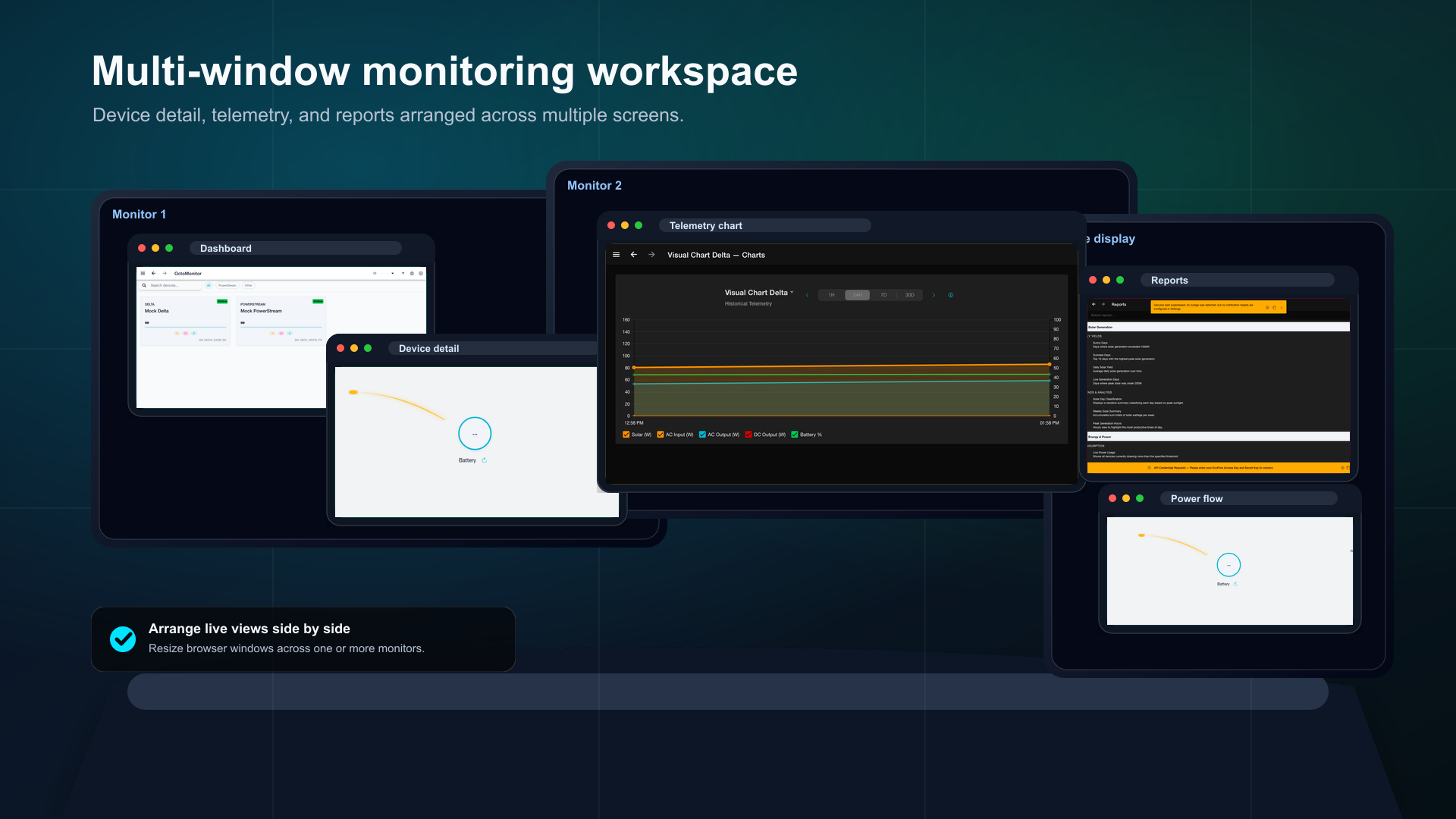
- Open device detail, telemetry, and report views in separate browser windows.
- Filter historical readings by device, date, time, notes, and sort order.
- Build local rules and review their triggers and outcomes in Automated Execution History.
- Compare solar generation, Smart Plug energy, AC input, battery changes, and lifetime estimates with recording coverage.
Getting started
Use OctoMonitor alongside the EcoFlow app for DELTA Pro, DELTA 2 Max, PowerStream, and Smart Plug / Socket monitoring. Explore the device guide for readings, reports, and supported controls.
Connection uses EcoFlow developer access and API credentials. The site includes a walkthrough for requesting developer access and a separate setup guide for storing credentials in OctoMonitor. Never publish keys or paste them into a public support request.
- Keep the EcoFlow app for firmware, account, setup, and unsupported controls.
- Explore preview mode, then connect your EcoFlow account for live monitoring.
- Treat API credentials as secrets and follow the in-app storage guidance.
- Use the free browser app first, then choose the install approach that suits your devices.